Blog

Photoshopping the Dust

Creating images and changing images and the distinction between those was the subject of the reading this week. For me, it recalled a class I took in my undergrad days called “True Fiction” – the subject of the class was the way in which film, photography, and books exist in the area between fact and fiction. In effect, these are objects are mediated- created with intent and interpreted by others with intent. We watched Errol Morris’s film “A Thin Blue Line” in an effort to draw attention to the way in which documents and photographs are mediated by their creators and their audience, and to drive home the idea that a film, like Morris’s, can be simultaneously “truth” and “fiction”.

The take away from that class, for me, was that we should be critical consumers of information and that there are always multiple interpretations. An idea that serves me well as a historian in estimating the value and meaning of my findings at an archive.

The reading today and our recent work on producing digital history has highlighted a related but distinct constellation of concerns.

When we photoshop a historical image, removing imperfections like dust, scratches and tears. Are we reducing the object’s value as a historical artifact? When it comes to editing photos I admit a level of uncertainty.  Am I destroying the “truth” of an image by cleaning it up? Or giving it to an audience to be best appraised? Am I distorting some reality by cropping, orienting or reversing an image so it sits prettier on my website? Or driving my argument by making it flow cleanly across the page?

In the production of scholarship we have a responsibility in shaping the interpretation of historical objects.  We critically assess what we’ve found by asking about intent and meaning and interrogating the record and seeing what shakes out. We do a great deal to frame the interpretation, we argue one thing or another and we dig up contextual information to locate what we’ve found in time and space.

But then we take all that stuff out and, in the pursuit of our argument, piece it together in a way that makes sense to us. In a way that reflects history as we understand it.

The answer to my question about photoshopping images comes in being transparent about making changes. It builds on a practice that we all already engage in. When I quote from a book I remove the author’s words from their context and in some ways distort its meaning. When I reproduce handwritten documents in neatly formed text I’ve distanced the text from the author. And when I utilize an image I have removed it from its context and reproduced it digitally. The thing is, we do it by making it expressly clear that this is a smaller piece of a larger work. We already add footnotes and citations to text, similarly, we should provide the audience with a clear idea of whether or not the image has been changed and where they can seek the original source.

I’m curious to see how others responded to the reading this week. In the meantime, I’ve already engaged in altering the historical record, as you can see below. I used the helpful tutorials to crop and make some repairs to a damaged photo. I made it a bit easier to see by cleaning up the image.

[Images Removed]

This week I commented on Kirk and Beth‘s blogs.


Editing Historical Images

I’ll admit it: I’ve been having a lot of fun. I had a moderate amount of experience using Photoshop coming into the class, but most of that experience involved slightly editing pictures or creating images from scratch. The tutorials have been really helpful in expanding my skill set in a not-so-intimidating way.  This week I played with two things extensively: first, I tackled the engraving tutorial created by Dr. Petrik, next I tried my hand at coloring an image. While I’m not entirely satisfied with any of these attempts, it was a great start.

[Image removed]

I started with the engraving above. This image is one I collected while I was working on my MA thesis. The engraving is one of the only images we have of the church buildings that housed dual (deaf and hearing) congregations on West Eighteenth St in Manhattan for forty years. The buildings were sold (and almost immediately demolished) in 1894.

Anyway, the image above is pretty clear, but I intentionally cleaned it up as you can see below:

[image removed]

I heightened the contrast to emphasize the details in the engraving and created a clean black and white image. Next I cleaned up the edges of the image – removing the sky and border shading on the top, right and bottom of the image. For me, it’s a cleaner image and something I could use in the creation of a header or something. I contemplated removing the buildings to the left, the sidewalk and bush to the right- but I liked that those features gave the image some context. I could have also removed the shadow that stretches across the face of the building, but let it remain for the same reason.

Next I wanted to try editing an photo:

[Image removed]

This is one of my favorite photos from my research. It is a rare casual photo of prominent deaf community members- in this case they seem to have been promoting a biking club they founded in the city. Given the clarity of the image and my interest in the topic, I decided to work on hand-tinting the image and I was surprised with the results. I spent some time cleaning up the image – removing some dust spots and smudges from the scanner.

[image removed]
Hand-tinted and modified image of Hodgson and Fox.

But I admit, I had too much fun with this. I wanted to emphasize the men and their bikes by coloring them alone- and found myself with a new appreciation for the photo entirely.  I was surprised to realize that Fox (the jaunty fellow on the right) has a cigarette perched on the corner of his lips. A minor fact but I’d missed this detail every other time I looked at the photo. The process of coloring their clothes got me thinking about fabric and color choices a great deal as well – what colors would have been popular at this time? Would Fox have color-coordinated his socks to his tie, as I did?

Because I couldn’t stop myself, I’ll also include a fully tinted image:

[Image removed]
A fully hand-tinted image.

These images are by no means perfect – I would want to spend a significant amount more time adding shading and details. A closer inspection revealed that there may be a pattern on those socks- something I’d like to highlight if I make another pass at these images.

Overall, as with everything, a new means of presenting information can also call up a host of new questions. Still, I’m enjoying the process.

This week I commented on Amanda’s and Beth’s blogs.

Color, Design and Photoshop

Screen Shot 2014-03-02 at 5.44.44 PMMoab -roadMoab -Canyonlands Natl ParkI’m having a lot of fun playing with the tools and tricks described in this week’s reading! I’ve used photoshop before but it was fun to try out some new techniques. Above I used some images from a trip to Moab – both of them took a little editing and cleaning up but transforming images into text was new for me and I like the results.

Overall, the work this week has me thinking ahead to my final project. The images I’ll be using are largely black and white images – but many might need some enhancing in order for them to display well on the web. That means that color and layout will have to play a much bigger role in capturing visitor’s attention and directing their movement through the portfolio.

I found the tips this week on color selection and use to be really helpful. In the case of my site, the subject matter doesn’t necessarily lend itself to bright colors- religious history and segregation don’t really scream “lively colors”. But I’d also like to avoid a dark and dreary sensibility. In this case, I think the integration of natural, neutral tones will probably go a long way in creating interest without disrupting the flow of the site.

This week I commented on Ben’s Blog.

Hard at work on a design

I don’t know about you guys, but this project has been a difficult one. I’m still trying to get the layout of my typography assignment functioning appropriately- so rather than posting a link to a finished project, I figured I’d give you a sense of how I’ve spent my time on this.

First I turned to my source material for information. As you can tell by the VERY high quality photos below, the majority of this material was collected during a research visit to church archives in Baltimore. I hoped to use these images as both typographical and compositional inspiration.

Type
Layered images of papers from Christ UMC for the Deaf archive, collected 2013.

Here I collected fonts from a number of church materials- letterheads, program books, and church registers- as well as items from the Deaf press that would be representative of this period.

Layered images of papers from Christ UMC for the Deaf archive, collected 2013.

I also looked at the layout and composition of these documents, collecting eight that were visually interesting.

Layered images of papers from Christ UMC for the Deaf archive, collected 2013.

I also began collecting some details that appeared across the texts – I’m hoping to be able to integrate these details in the final project.

Armed with some visual inspiration, I also set about developing a mock-up of the final design.

Mock-Up

You can see a rough version of it above and a link to my page here. The challenge for the past two days has been translating all the ideas into Dreamweaver.  I hope you are all having great luck with this!

This week I commented on Sara’s Blog.

THATCamp Mallet Results

(This post was created in the Spring of 2014 as part of a collective project undertaken by the 2013-2014 cohort of Digital History Fellows at RRCHNM. Each of the subsequent posts (written by individual fellows or collectively) originally appeared at the Digital History Fellowship Blog. These posts have been added to my blog to provide an comprehensive representation of the project. THATCamp Mallet Results was posted by Anne McDivitt.)

We have spent the last few weeks working to build a python script that would allow us to download and prep all of the THATCamp blog posts for topic modeling in MALLET (for those catching up, we detailed this process in a series of previous posts). As our last post detailed, we encountered a few more complications than expected due to foreign languages in the corpus of the text.  After some discussion, we worked through these issues and were able to add stoplists to the script for German, French, and Spanish.  Although this didn’t solve all of our issues and some terms do still show up (we didn’t realize there was Dutch too), it led to some interesting discussion about the methodology behind topic modeling.  Finally we were able to rerun the python script with the new stopwords and then feed this new data into MALLET.

MALLET, or MAchine Learning for Language Toolkit, is an open source java package that can be used for natural language processing.  We used the Programming Historian’s tutorial on MALLET.  Topic modeling is an important digital tool that analyzes a corpus of text and seeks to extract ‘topics’ or sets of words that are statistically relevant to each other.  The result is a particular number of word sets also known as “topics.” In our case we asked MALLET to return twenty topics based on our set of THATCamp blog posts. The topics returned by MALLET were:

  1. xa digital art history research university scholarship graduate field center publishing open today institute cultural knowledge professor online world
  2. university games pm humanities http digital september knowledge kansas saturday game conference state registration play information representation workshop boise
  3. thatcamp session sessions day participants free technology page unconference university nwe conference discussion information google propose hope event proposals
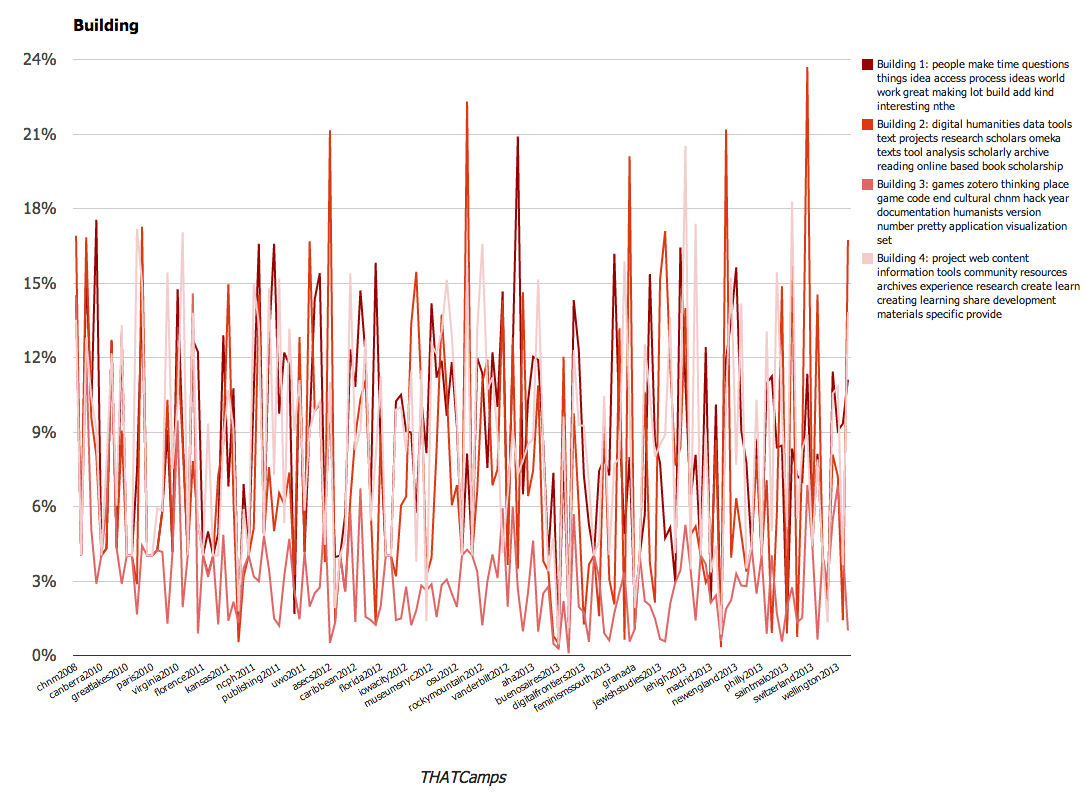
  4. people make time questions things idea access process ideas world work great making lot build add kind interesting nthe
  5. digital humanities data tools text projects research scholars omeka texts tool analysis scholarly archive reading online based book scholarship
  6. digital humanities session dh library libraries support projects open discussion librarians amp talk work journal sessions propose faculty list
  7. history public digital historical collections museum media project projects mobile online maps museums collection historians users sites site applications
  8. games zotero thinking place game code end cultural chnm hack year documentation humanists version number pretty application visualization set
  9. session open area data workshop tool knowledge teach interested bay prime bootcamp gis workshops reality night thatcampva virginia lab
  10. work interested students ways teaching post working talk writing blog love issues don conversation create collaborative thinking start discuss
  11. project web content information tools community resources archives experience research create learn creating learning share development materials specific provide
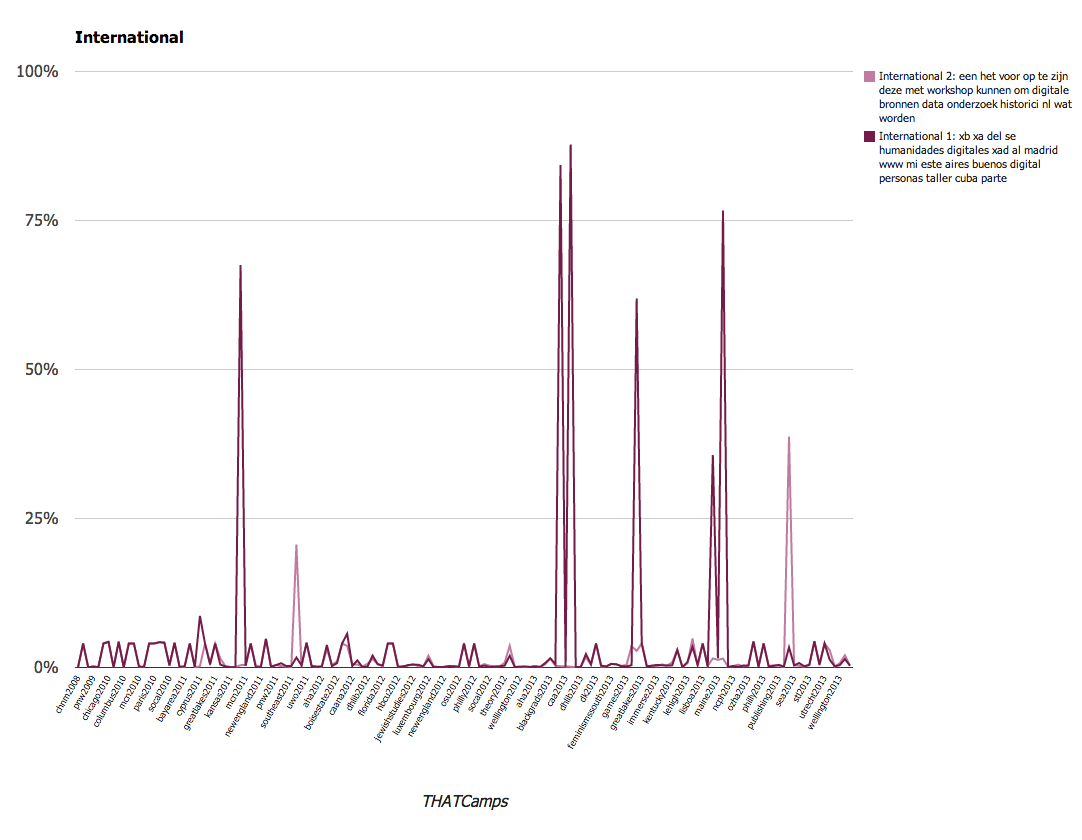
  12. xb xa del se humanidades digitales xad al madrid www mi este aires buenos digital personas taller cuba parte
  13. caption online id align width open attachment accessibility women read university american building accessible gender media november floor race
  14. data http org session www open twitter texas good wikipedia nhttp status wiki start commons drupal metadata people crowd
  15. xa workshop session omeka publishing http gt propose org workshops friday docs open hands amp doc studies topic discuss
  16. students digital learning technology education media college faculty humanities research game pedagogy student courses classroom assignments skills arts social
  17. xa oral digital humanities video event local application community offer interviews planning center education software jewish weekend college histories
  18. een het voor op te zijn deze met workshop kunnen om digitale bronnen data onderzoek historici nl wat worden
  19. social media technology studies arts performance museums xcf play participants cultural performing reading st email object platforms interaction technologies
  20. xa thatcamp org http thatcamps details read movement published planned access nthatcamp browse software follow break series google join

As you can see we have an impressive list of terms. Before we organize them in a meaningful way, we will briefly point out a common problem that scholars may confront when working with MALLET. As you may notice, we realized that we have quite a few errors such as ‘xa’ that appear in the results.  While we don’t have a great answer for why this is, we think it has to do with complex encoding issues related to moving content from a WordPress post that is stored in a MySQL database using Python. Each of these uses a different coding system and the error appears to be related to non-breaking spaces.  A little bit of Googling revealed that the non-breaking space character used by WordPress is ‘&nbsp’ which is different that the ASCII encoding of a non-breaking space ‘/xa0’.  When Python reads WordPress’s non-breaking space character ‘&nbsp’, it understands the space but encodes it as the UTF-8 version ‘/xa0’.  As second year fellow Spencer Roberts explained the issue is that meaning is lost in translation. He used this analogy: Python reads and understands the French word for “dog” then translates it and returns the English word.

In this case, what shows up in our results is not ‘/xa0’ but rather ‘xa’ because we had stripped out all of the non-alphanumeric characters prior to running the data through MALLET.  We think the errors such as ‘xa’ and ‘xb’ are because of these encoding issues.  Anyone interested in clarifying or continuing this discussion with us can do so in the comments.

Returning to our MALLET results, our next challenge was to present and analyze the large amount of data.  We drew from both Cameron Blevins and Robert K. Nelson in our approach and decided to group the topics by theme so that trends could be more easily identified.  We determined that there were about seven broad themes in the corpus of THATCamp blog posts from 2008 to present:

  1. Accessibility
  2. Building
  3. Community
  4. International
  5. Pedagogy
  6. Public Digital Humanities
  7. THATCamp Structure

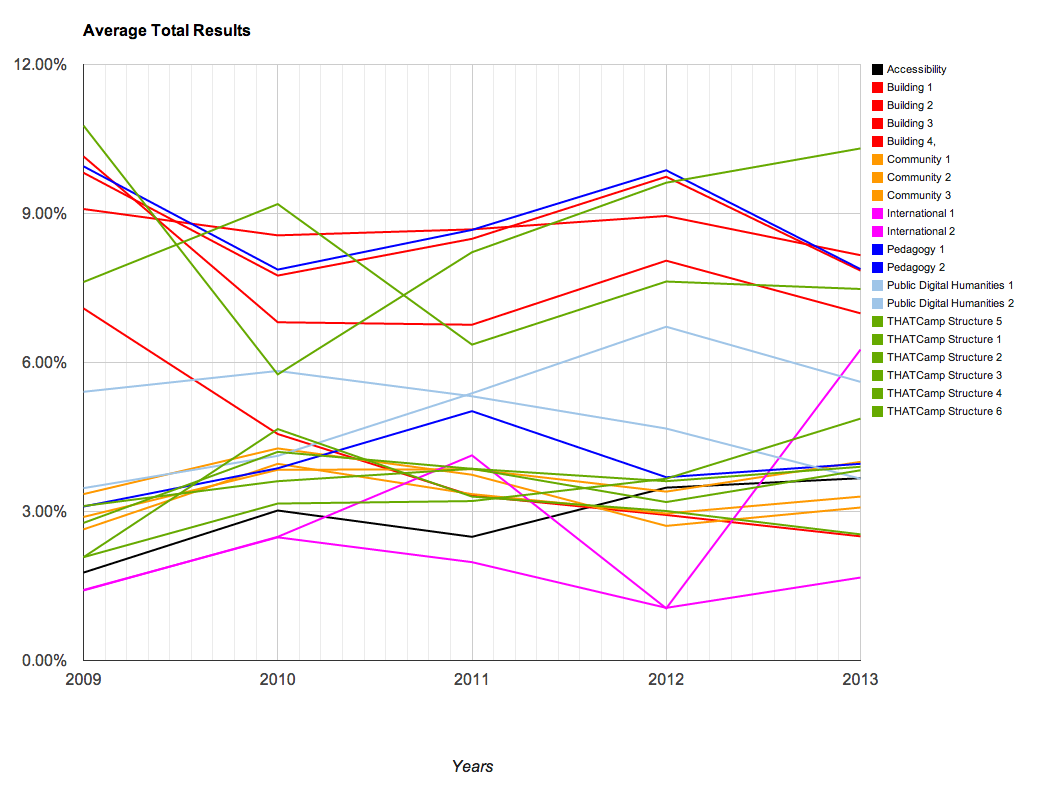
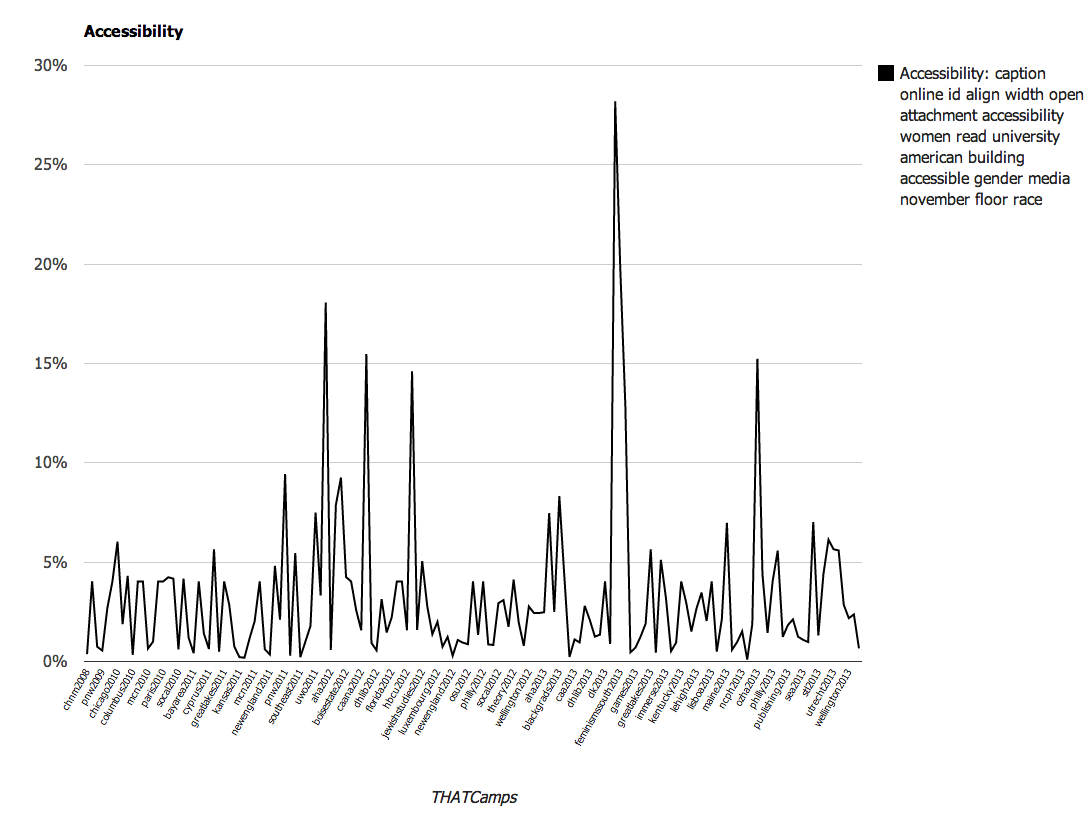
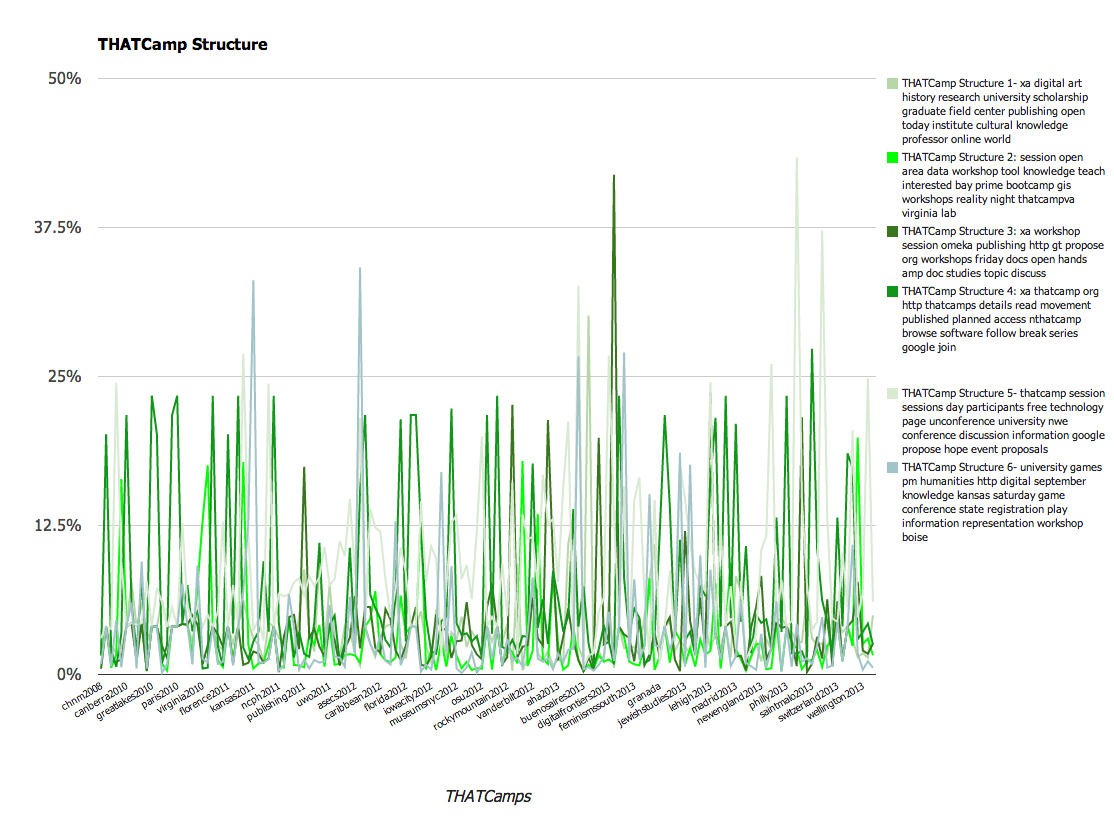
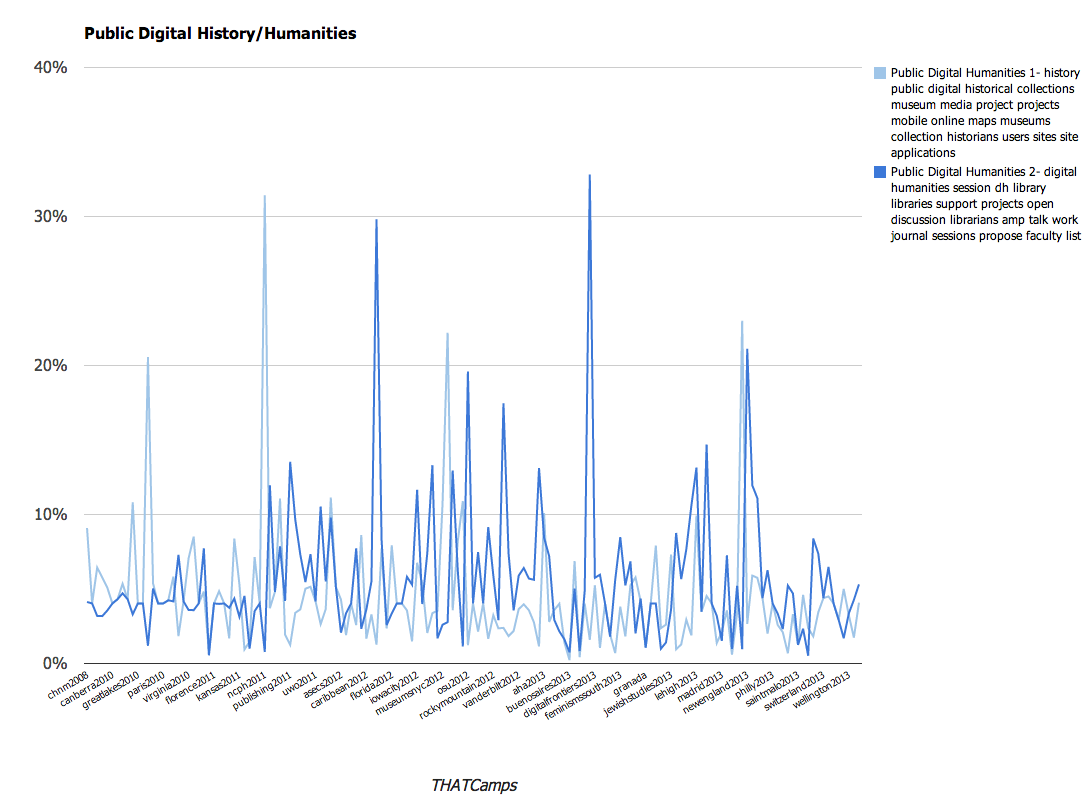
Utilizing these larger categories, we were able to create several charts that demonstrate the changes over time with the THATCamps. The charts are available below; you’ll note that we have graphed them using percentages. The percentages that appear represent the number of times that topic occurred within the posts at that camp.

Chart of Topics Overall
Topics Overall
Chart of the topic Accessibility.
Topics relating to Accessibility
Graph of the Community Topic
Topics relating to Community
Graph of the THATCamp Structure Topics
Topics relating to THATCamp Structure
Graph of topics relating to Pedagogy
Topics relating to Pedagogy
Graph of topics relating to Public Digital Humanities
Topics relating to Public Digital Humanities
Graph of topics relating to building in the humanities.
Topics relating to Building
Topics relating to the international influence of THATCamp.
International Digital Humanities

We found these results to be particularly interesting. A larger overall conclusion is that THATCamp content emphasizes the various applications of digital technology to scholarship, from public uses to tool building or teaching. Since THATCamp was founded, it has become a more varied community. However close examination of the topic models this exercise produced reveals that a number of the same terms appear frequently across all of the topic models (“digital”, for instance, appears in 8 of the 20 topics). This references the way in which ideas are circulated throughout camps and unifies the community. It also reflects the subjects that are the focus of the community.

If you’re interested in the data, you can view the various files here:

Structure and Layout

The reading this week focused largely on structure and layout and it has me thinking about the page from a new perspective. Generally, I think I’ve approached print media and web pages from a functional perspective; paying more attention to content and only distracted by form when it is… distracting.

The examples in Thinking with Type,  were  great because they reinforced the importance of layout and design, from both an aesthetic and a functional standpoint. The examples on pages 152, 154, 158-159, and 188 got me thinking about how we use footnotes on a page and how this may be made more or less effective as well as more aesthetically pleasing. I connected this with last week’s reading by Dr. Petrik, Scholarship on the Web: Managing Footnotes. In the same way that the physical texts described in Lupton’s book disrupted or divulged information in meaningful ways, presenting information on the web requires thought.

HTML & CSS built on this line of thinking and forced me to consider the users of a webpage.  Who do I want to visit my webpage and what do I want them to see when they get there?

My (potential) visitors are varied. There’s the people of this class (who are forced to look at this page), my parents (who google me for no discernible reason), and, hopefully at some point, other history scholars and prospective employers.

The first two groups, I’m sorry to say, are not my focus in constructing a website. Rather, I’d like a page that fosters discussion with scholars in my field of history, primarily deaf history. And I’d like to create something that showcases my (developing) skill-set. I’m still deciding, however, what that page would look like.

This week I commented on : Beth’s and Anne’s blogs.

Unexpected Challenges Result in Important and Informative Discussions: a transparent discussion about stripping content and stopwords

(This post was created in the Spring of 2014 as part of a collective project undertaken by the 2013-2014 cohort of Digital History Fellows at RRCHNM. Each of the subsequent posts (written by individual fellows or collectively) originally appeared at the Digital History Fellowship Blog. These posts have been added to my blog to provide an comprehensive representation of the project. When these posts were written by others, I have noted the authorship.)

As described in previous posts, the first year Digital Fellows at CHNM have been working on a project under the Research division that involves collecting, cleaning, and analyzing data from a corpus of THATCamp content. Having overcome the hurdles of writing some python script and using MySQL to grab content from tables in the backend of a WordPress install, we moved on to the relatively straightforward process of running our stripped text files through MALLET.

As we opened the MALLET output files, excited to see the topic models it produced, we were confronted with a problem we didn’t reasonably anticipate and this turned into a rather important discussion about data and meaning.

As a bit of background: topic modeling involves a process of filtering “stopwords” from a data set. Frequently a list of stopwords includes function words, or terms that appear repeatedly in discourse, like: “a, an, the”. These are filtered out because they serve a grammatical purpose but have little lexical meaning. Additionally, errors, misspellings, and lines of code that were skipped in the previous steps can also be filtered out at this stage.

As we opened the file of keys produced by MALLET, we found that some terms appeared that raised questions about what should or should not be included in our analysis. In particular, the discussion centered around spelling errors and function words in Spanish and French.

The conversation that followed, reproduced below, was significant and as people look through the results of this project or consider their own efforts reproduce something like this elsewhere, we’d like to be transparent about the decisions we made and, perhaps, spur a discussion about how to address scenarios like this in the future.

_____________________________________________

Take a look at what MALLET spit out: there are some errors.
Stuff like “xe, xc, zijn, xb, en, la”.

Yeah, I saw that.
We can make a custom stoplist to remove those.
Make a list and we’ll add it.

Interesting keys though – did you see that “women” came up in #0?
I’m excited to see this once it’s all graphed.

There’s some stuff though that I’m not sure we want to remove: Is CAA an error or an abbreviation? “socal” – is that social misspelled or Southern California, abbreviated?
Hmm, that could be an organization..

Yeah, SoCal, as in Southern California.
There was a camp there.
This adds a larger question: do we remove misspellings?
For clarity?

I have mixed feelings.

Me too.

I think it’s appropriate to remove backend stuff-
tags and metadata, but content is not something we should modify.

I agree.
We don’t want to skew the results.
Some of it occurred when we stripped all the alphanumeric stuff out.
It took out apostrophes- causing words like “I’ve” to become “I ve”.

The errors in themselves are telling about the nature of THATCamps.
That the content is generated spontaneously
lends itself to deviations from appropriate spelling ect.

I agree

Look at #17 and 18.

Whoa, where did “humanidades” come from?
Oh, right! There are international conference posts in here too!

How do we handle this?
Its possible to strip out the camps that are not in English
or even to run analysis on them separately.
I don’t want to skew the results but this also throws things off.

I know.
I say we leave it. It shows a growing international influence.
We’ll be able to see the emergence of International THATCamps.

I’ve never run into this before.
It brings up some interesting issues –
I wonder if there is standard procedure for something like this.

What about things like “en” which is Spanish for “is”-
that would have been removed on an English stoplist.
And now function words in Spanish and French
seem to appear more frequently because
the English terms have been filtered out.
How do you do topic modeling with multiple languages?

What about special characters?
We’ve stripped stuff out, how about how that would affect the appearance of words?

We have to find a stoplist for each of the languages.
To strip out the function words of all of them.

Good call. This got complicated quick!

Agreed.

_____________________________________________

As outlined above, when we opened the text file with keys, new questions were raised about the relevance and complications of running a particular stoplist on a corpus of texts. Similarly, we were forced to rethink how we handle misspellings and unfamiliar abbreviations. In the end, we tracked down stoplists for Spanish (and French) terms, so that no function words in any language would skew the results of our analysis. We also carefully examined the keys to identify abbreviations and misspellings and decided that they are a significant contribution to the analysis.

A few questions remained for us: how might removing non-alphanumeric characters (a-z,A-Z,0-9) alter the meaning of special characters used in languages other than English? How have others responded to spelling errors? How significant are errors?

Hopefully a post of this nature will foster discussion and produce a stronger, more complete analysis on this and other documents.

Pre-processing Text for MALLET

(This post was created in the Spring of 2014 as part of a collective project undertaken by the 2013-2014 cohort of Digital History Fellows at RRCHNM. Each of the subsequent posts (written by individual fellows or collectively) originally appeared at the Digital History Fellowship Blog. These posts have been added to my blog to provide an comprehensive representation of the project. Pre-processing Text for MALLET was written by Amanda Regan.)

In our previous post, we described the process of writing a python script that pulled from the THATCamp MySQL Database. In this post, we will continue with this project and work to clean up the data we’ve collected and prepare it for some analysis. This process is known as “pre-processing”. After running our script in the THATCamp database all of the posts were collected and saved as text files. At this stage, the files are filled with extraneous information relating to the structure of the posts. Most of these are tags and metadata that would disrupt any attempts to look across the dataset. Our task here was to clean them up so they could be fed into MALLET. In order to do this, we needed to strip the html tags, remove punctuation, and remove common stopwords. To do this, we used chunks of code from the Programming Historian’s lesson on text analysis with python and modified the code to work with the files we had already downloaded.

Defining a Strip Tags Function

We began by writing some functions so that we could import and call all of them at once. First, we removed the html tags from the document. Essentially we asked python to look at each character in the document and locate each opening tag, ‘<‘. If an opening tag was identified, it would ignore it and any following characters until the closing tag, ‘>’. We drew on the code that is used in the Programming Historian and modified it so that it would begin at the start of the text file. The end-result of the function was this:

def stripTags(pageContents):

	content = pageContents[0:]

	inside = 0
	text = ' '

	for char in content:
		if char == '<': 			inside = 1 		elif (inside == 1 and char == '>'):
			inside = 0
		elif inside == 1:
			continue
		else:
			text += char

	return text

The function begins at the beginning of a variable called page contents and essentially returns any character that is not in between the opening and closing html tags.

Removing Non-Alpha Numeric Characters

Next, we needed to define a function that would remove all of the non-alpha numeric characters in the text. Punctuation is removed because it also distorts the results of text analysis. Borrowing again from the Programming Historian we defined a function that imported regular expression functions. According to the python documentation a Regular Expression (RE) specifies a set of strings that matches it. The function we adapted from the Programming Historian asks python to remove everything that doesn’t match the string of unicode characters defined by RE (A-Z,a-z,0-9). It then splits them into a list.

def stripNonAlphaNum(text):
	import re
	return re.compile(r'\W+', re.UNICODE).split(text)

Removing Stopwords

The last function we needed to define was one that would remove stopwords from the text. This process is meant to filter out common function words. We used the same function defined in the Programming Historian lesson and the open source list of stopwords that the lesson drew on to accomplish this.

The stop words were defined at the top of list of functions:

stopwords = ['a', 'about', 'above', 'across', 'after', 'afterwards']
stopwords += ['again', 'against', 'all', 'almost', 'alone', 'along']
stopwords += ['already', 'also', 'although', 'always', 'am', 'among']
stopwords += ['amongst', 'amoungst', 'amount', 'an', 'and', 'another']
stopwords += ['any', 'anyhow', 'anyone', 'anything', 'anyway', 'anywhere']
stopwords += ['are', 'around', 'as', 'at', 'back', 'be', 'became']
stopwords += ['because', 'become', 'becomes', 'becoming', 'been']
stopwords += ['before', 'beforehand', 'behind', 'being', 'below']
stopwords += ['beside', 'besides', 'between', 'beyond', 'bill', 'both']
stopwords += ['bottom', 'but', 'by', 'call', 'can', 'cannot', 'cant']
stopwords += ['co', 'computer', 'con', 'could', 'couldnt', 'cry', 'de']
stopwords += ['describe', 'detail', 'did', 'do', 'done', 'down', 'due']
stopwords += ['during', 'each', 'eg', 'eight', 'either', 'eleven', 'else']
stopwords += ['elsewhere', 'empty', 'enough', 'etc', 'even', 'ever']
stopwords += ['every', 'everyone', 'everything', 'everywhere', 'except']
stopwords += ['few', 'fifteen', 'fifty', 'fill', 'find', 'fire', 'first']
stopwords += ['five', 'for', 'former', 'formerly', 'forty', 'found']
stopwords += ['four', 'from', 'front', 'full', 'further', 'get', 'give']
stopwords += ['go', 'had', 'has', 'hasnt', 'have', 'he', 'hence', 'her']
stopwords += ['here', 'hereafter', 'hereby', 'herein', 'hereupon', 'hers']
stopwords += ['herself', 'him', 'himself', 'his', 'how', 'however']
stopwords += ['hundred', 'i', 'ie', 'if', 'in', 'inc', 'indeed']
stopwords += ['interest', 'into', 'is', 'it', 'its', 'itself', 'keep']
stopwords += ['last', 'latter', 'latterly', 'least', 'less', 'ltd', 'made']
stopwords += ['many', 'may', 'me', 'meanwhile', 'might', 'mill', 'mine']
stopwords += ['more', 'moreover', 'most', 'mostly', 'move', 'much']
stopwords += ['must', 'my', 'myself', 'name', 'namely', 'neither', 'never']
stopwords += ['nevertheless', 'next', 'nine', 'no', 'nobody', 'none']
stopwords += ['noone', 'nor', 'not', 'nothing', 'now', 'nowhere', 'of']
stopwords += ['off', 'often', 'on','once', 'one', 'only', 'onto', 'or']
stopwords += ['other', 'others', 'otherwise', 'our', 'ours', 'ourselves']
stopwords += ['out', 'over', 'own', 'part', 'per', 'perhaps', 'please']
stopwords += ['put', 'rather', 're', 's', 'same', 'see', 'seem', 'seemed']
stopwords += ['seeming', 'seems', 'serious', 'several', 'she', 'should']
stopwords += ['show', 'side', 'since', 'sincere', 'six', 'sixty', 'so']
stopwords += ['some', 'somehow', 'someone', 'something', 'sometime']
stopwords += ['sometimes', 'somewhere', 'still', 'such', 'system', 'take']
stopwords += ['ten', 'than', 'that', 'the', 'their', 'them', 'themselves']
stopwords += ['then', 'thence', 'there', 'thereafter', 'thereby']
stopwords += ['therefore', 'therein', 'thereupon', 'these', 'they']
stopwords += ['thick', 'thin', 'third', 'this', 'those', 'though', 'three']
stopwords += ['three', 'through', 'throughout', 'thru', 'thus', 'to']
stopwords += ['together', 'too', 'top', 'toward', 'towards', 'twelve']
stopwords += ['twenty', 'two', 'un', 'under', 'until', 'up', 'upon']
stopwords += ['us', 'very', 'via', 'was', 'we', 'well', 'were', 'what']
stopwords += ['whatever', 'when', 'whence', 'whenever', 'where']
stopwords += ['whereafter', 'whereas', 'whereby', 'wherein', 'whereupon']
stopwords += ['wherever', 'whether', 'which', 'while', 'whither', 'who']
stopwords += ['whoever', 'whole', 'whom', 'whose', 'why', 'will', 'with']
stopwords += ['within', 'without', 'would', 'yet', 'you', 'your']
stopwords += ['yours', 'yourself', 'yourselves']

The function definition was called below all of the other functions:

def removeStopwords(wordlist, stopwords):
    return [w for w in wordlist if w not in stopwords]

The function essentially asks python to compare a list of words called ‘wordlist’ to the list of stopwords defined above. It returns every word not defined in the list of stopwords.

We named the file with all of these functions ‘rmv.py’ and then started a new python script that would import these functions and apply them to all of the text files we downloaded from the THATCamp database.

Defining a script to remove all of the tags

After we had defined all the necessary functions to remove html tags, strip out any non-alphanumeric characters, and remove stopwords, we needed to write a script that would import and apply all of these functions.

First, we import both the os and sys modules so that we can ask python to interact with the files located on our computer. We also import the rmv file that contains all of the functions.

import os, sys
import rmv

Next, we begin to define a loop that will apply each of those functions to a text document and then loop back and continue until it has done this with every text file. Setting x = 1 allows us to define where in the list of documents the script to start and we also instruct python to only complete the following loop while x is less than 300. This gives python a starting and stopping point.

x = 2
while x < 300:

Everything that follows the ‘while’ statement is part of the loop and we’ll use a try and except statement to tell python what to do if a file doesn’t exist. We begin by defining the file name and opening the text file. In the previous post, we downloaded all of the posts from each that camp and named them ‘wp_x_posts.txt’. ‘X’ increased sequentially and matched the table number in the THATCamp database. We’ll do the same thing here asking python to open a text file called ‘wp_x_posts.txt’ and increase x sequentially each time it loops through. We use the os commands to open the file, read it, and then store it in a variable called content.

try:
		f = open('wp_' + str(x) + '_posts.txt', 'r')
		content = f.read()

Now that python has opened and read the content we can begin to call the functions we defined in ‘rmv.py’ on the content. We’ll work through those functions in the order we added them to the ‘rmv’ module and call them using several variables. First, we call ‘rmv.stripTags’ on the content variable we defined above and store it in a variable called ‘words’. Then we call ‘rmv.stripNonAlphaNum’ on the variable words we just created and store it in a variable called ‘fullwordlist’. We’ve now removed the tags and all of the non-alphanumeric characters from the post. The final function we need to call is the ‘removeStopwords’. We have to define what to remove the stopwords from and where the stopwords can be found. To do this we call the function we defined, ‘rmv.removeStopwords’, on ‘fullwordlist’ and ask it to remove any of the words from the stoplist by referring to ‘rmv.stopwords’. We tell python to store this all in a variable called ‘wordlist’.

words = rmv.stripTags(content).lower()
		fullwordlist = rmv.stripNonAlphaNum(words)
		wordlist = rmv.removeStopwords(fullwordlist, rmv.stopwords)

Now that python has stripped the tags, non-alphanumeric characters, and the stopwords from the file the resulting text is in a variable called wordlist. That data needs to be re-written to the file. To accomplish this we asked the os module to create a new file, defined as ‘fo’ rather than ‘f’ this time, and open the same string as before: ‘wp_x_posts.txt’. Then we tell it to write fo to the file with a line break after each word. However, because the text in wordlist is now a python list we have to instruct python to write a list rather than a string to the file. To do this we call ‘.join’ on the wordlist variable which is a built-in type in python that concatenates the lists. The ‘.join’ function combines a word list into a string and by adding a line break, ‘/n’, each of our words is returned neatly onto a new line in our file.

fo = open('wp_' + str(x) + '_posts.txt', 'w')
		fo.write('\n' .join(wordlist))

Lastly we need to tell python what to do if a file doesn’t exist and add one to the loop causing it to repeat on the next sequentially numbered file. The except statement here tells python what to do if a file doesn’t exist. Normally it would throw an error and stop the script from running but by telling python to clear the exception it just ignores the error. Finally, adding one to x causes the script to repeat.

except Exception:
		sys.exc_clear()

	x += 1

The result is 191 cleaned up text files ready to be processed using MALLET.

Typography and Design

This week focused on the subject of type, something I genuinely enjoy. I’m one of those people who harbors strong feelings about comic sans and spends a little too much time selecting fonts for projects.

Still, it was interesting to circle the topic of typography  from a number of perspectives: theoretically, practically, aesthetically, historically.  It encouraged me to think about the use of type in new in a new way.

One of the things that drew me, was the way in which people seemed both comfortable and uncomfortable describing fonts. You could simply refer to them by name, and many did, but others still searched for ways to convey the meaning of fonts. In the film Helvetica, for instance, the subjects frequently described fonts outside of spacing, cap height or ligature. Instead, they were using adjectives generally associated with objects or sensory perception, rather than type.

“this has a kind of belt and suspenders look, it needs to be, you know, much more elegant, hand-lasted shoe.” – Jonathan Hoefler

Errol Morris’s examination of this in his study of the subject, Hear, All Ye People; Hearken, O’ Earth reinforces the idea. He suggests that fonts have the capacity to evoke “truthiness”, while David Dunning suggests that a font is “slightly tuxedo.” As Jonathan Hoefler  explains in the interview,   fonts are frequently described using terms that are “qualitative… and subjective”.  They seem to evoke meaning outside of the content they represent.

As Lupton frames this concept succinctly as “typography as discourse” (Thinking with Type, pg 97). In effect, this is what Morris’s New York Times study strives to identify: if type is a form of discourse, what are it’s parameters? How does one convey “truthiness”? The film Helvetica, suggested a changing discourse – fonts took on new meaning in new contexts. Morris’ look at the history of Baskerville certainly demonstrates a changing understanding of one type face.

It made me wonder: in the future will we be judged for the vitriolic  reactions to comic sans (seen here, here, and here)?

Overall, the big points I took away from this week came with the last part of the Ducket reading in HTML & CSS . Why does this font stuff matter? Because in constructing webpages, we are choosing elements not solely based on our own personal preference. We’ve got to be aware of the interests and concerns of the potential visitors to our site. In effect, as much as I love the details of a decorative font or a script font, my readers may not. Clarity should be of heightened concern in choosing fonts.

My webpage is accessible through this blog (click on Digital Portfolio at the top of the page, or click here.)

This week I commented on: Amanda’s Blog and Becca’s Blog.

Extracting Data from the THATCamp Database Using Python and MySQL

(This post was created in the Spring of 2014 as part of a collective project undertaken by the 2013-2014 cohort of Digital History Fellows at RRCHNM. Each of the subsequent posts (written by individual fellows or collectively) originally appeared at the Digital History Fellowship Blog.  These posts have been added to my blog to provide an comprehensive representation of the project. Extracting Data from the THATCamp Database was written by Amanda Regan.)

This week we’ve continued to work on building a python script that will extract all of the blog posts from the various THATCamp websites. As Jannelle described last week, our goal was to write a script that downloads the blog posts in plain text form and strips all of the html tags, stopwords, and punctuation so that we can feed it into MALLET for topic modeling and text analysis. After several long days and a lot of help from second year fellow Spencer Roberts, we’ve successfully gotten the code to work.

To recap, the script should do the following:

  1. connect to the mySQL database
  2. select the relevant table using a sql query.
  3. open a text file and write the content from the database
  4. loop over the code and do this for each table

Connecting to the MySQL database has to be done in two places. First in the terminal using a secure shell and secondly in the script. To connect in the terminal, we used a secure shell port tunnel which allowed our computer to communicate with the database.

ssh -L 3306:localhost:3306 user@host.edu

Next, we began writing a python script that would connect to the database and download all of the blog posts from each of the THATCamp sub-sites. The THATCamp website is a wordpress multisite install with multiple tables for each individual THATCamp (over 200 individual camps). The blog posts are stored in a table labeled ‘wp_xx_posts’, with xx being the number assigned to a particular THATCamp. To complicate matters, the posts are not perfectly sequential. There are several skipped numbers for content that has been deleted or created erroneously. Our script would need to respond to these challenges.

The first step was to import the relevant python libraries. For this script, we first imported the MySQLdb module and asked python to refer to library as ‘mdb’. We also imported the os python module which allows the script to interact with the operating system. In this case, we used it to open and write to text files.

import MySQLdb as mdb
import os

The next portion of the script defined a loop and designated where in the database to find the blog post data. Because of the naming convention we needed python to start by looking for wp_1_posts and continue to run the same operation for each sequentially numbered table.

x = 1
while x < 500:
	table= 'wp_' + str(x) + '_posts'
	query= "SELECT post_content FROM "+ str(table) + " WHERE post_status = 'publish' AND post_type = 'post'"

The beginning portion of the code defines a loop and tells python to begin at 1 and count up to 500. Each time python loops back it will look for a table named ‘wp_x_posts’. The script then defines a MySQL SELECT query which tells python where to look for the content and defines what content it should pull. In this case, we had to specify that the query should pull the contents of data that matched the following criteria:

  • In the post_content column
  • From the table defined by the string above (wp_x_posts where x increases sequentially each loop)
  • Where the Post_status is published
  • And where the Post_type is post

So far the code has given python instructions on where to query the information from and has set up a loop. The next step is to actually tell python how and where to connect to the database as well as what to do with the information it receives. First, python should open a new file and save it with the same name as the table. The string defined above will name the file wp_x_posts.txt and will count up sequentially because of the loop. The file permission is set to ‘a’ so that python can add to the document each time it pulls a row from the database.

f = open('wp_' + str(x) + '_posts.txt', 'a')

Next, we set up a compound statement in python using try and except to create a statement that will download and write the content to the file. It will also provide an exception that will tell python what to do if the table doesn’t exist in the database.

try:
		con = mdb.connect(host="127.0.0.1", port=3306, user="usrname", passwd="pass", db="clone-thatcamp");

		cur = con.cursor()
		cur.execute(str(query))

		rows = cur.fetchall()

		for row in rows:
			line = str(row)
			f.write(line +'\n')

The MySQLdb module that we imported at the top of the script uses the cursor method to create a cursor object for processing MySQL statements. The cursor is first created then it executes the query which we defined above. It then fetches all of the rows that are returned by the query and prints each one to the open text file. It prints the rows one by one inserting a line break after each one.

An additional challenge, described above, was that while tables in the database were numbered sequentially, there are occasional skips. For example there isn’t a “wp_1_posts” but there is a “wp_2_posts”. When we were writing the script we kept encountering an error when python couldn’t find a table. To get around this we used the except statement. The except statement tells python to remove the empty text file if the table does not exist so that we don’t have a bunch of empty and useless text files. Using the operating system function, python deletes any file that it can’t pull data for.

 except:
	os.remove('wp_' + str(x) + '_posts.txt')
	f.close

Finally, python adds one to x, causing the script to loop back to the top and follow the instructions for each sequential table.

 x += 1

When we ran the program it downloaded over 200 plain text files for us to work with. However, the files were often a mess. They had html tags and some very odd formatting so we had to go through and clean them up. Our next blog post will describe how we cleaned up these text files to prepare them for topic modeling with MALLET.

The final code looks like this:

import MySQLdb as mdb
import os

x = 1
while x < 500:
	table= 'wp_' + str(x) + '_posts'
	query= "SELECT post_content FROM "+ str(table) + " WHERE post_status = 'publish' AND post_type = 'post'"

# save as file
	f = open('wp_' + str(x) + '_posts.txt', 'a')

	try:
		con = mdb.connect(host="127.0.0.1", port=3306, user="usr", passwd="password", db="clone-thatcamp");

		cur = con.cursor()
		cur.execute(str(query))

		rows = cur.fetchall()

		for row in rows:
			line = str(row)
			f.write(line +'\n')

	except:
		os.remove('wp_' + str(x) + '_posts.txt')
		f.close
	x += 1

Download the entire code here.